Accessibility Statement Generator
Fill in your site, the standard you aim for, its status, known limitations and how people can reach you; copy or download the statement.
Recent
Your last 10 settings, saved only in this browser. Nothing is uploaded.
The accessibility statement generator is a free tool that helps you write a public accessibility statement for a website or app. You fill in the details on the left, check the live preview on the right, and then download the result as HTML or Markdown, copy it, or print it to PDF. It runs in your browser, and you do not need an account or sign-up.
An accessibility statement tells visitors how accessible your site is, which parts are not, and how to contact you about problems. The tool follows the points that the W3C Web Accessibility Initiative (WAI) recommends and helps you write them in plain language. It writes the statement; it does not audit your site.
How to use the Accessibility Statement Generator
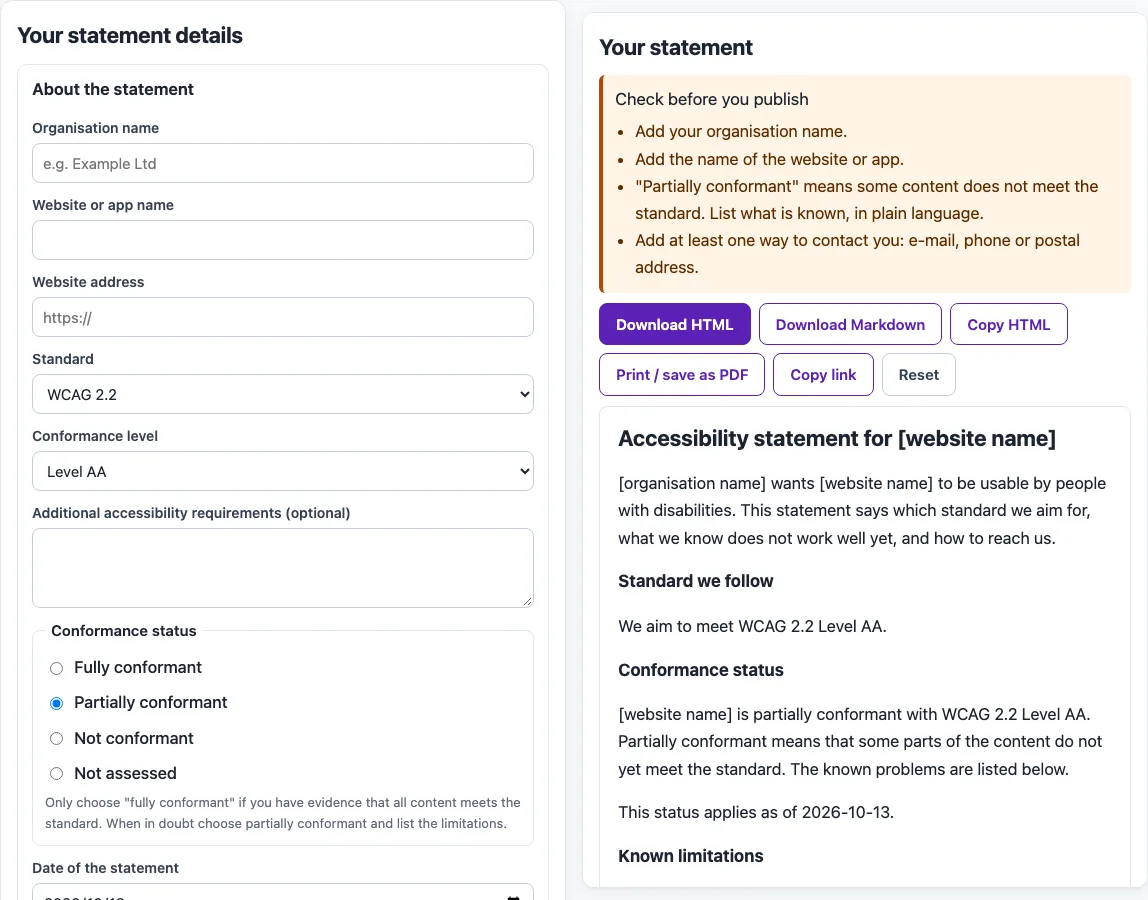
Work through the left-hand sections from top to bottom, then check the preview before you export.
- Under About the statement, enter your organization, the website or app name, and its address (URL). Choose the standard and level, set the conformance status, add any additional requirements, and enter the date.
- Under Known limitations, add one row for each limitation. For each row, enter the content, the problem, and a workaround if you have one. Write plainly, for example “videos do not have captions.”
- Under Technologies and compatibility, list the technologies your site relies on and any browsers or setups it is known not to work with.
- Under Assessment and measures, describe how you checked the site and what you do to keep it accessible.
- Under Feedback, contact and complaints, add a contact route for people who meet problems, a typical response time, and how to make a formal complaint.
- Read the Check before you publish warnings in the right-hand preview and fix each one.
- Use Download HTML, Download Markdown, or Copy HTML to get the statement. Use Print / save as PDF to keep a copy as a PDF.
Your draft is autosaved in your browser, so it is still there when you return on the same browser. Copy link gives you an address that keeps your short fields, and Reset clears the form.
What must an accessibility statement contain?
An accessibility statement must contain at least three things: a commitment to accessibility for people with disabilities, the accessibility standard you applied (for example WCAG 2.2), and contact information for people who meet problems. The W3C also advises adding known limitations in plain terms, the measures you take, the browsers your site supports, and the environments you tested.
Write for visitors, not developers. The W3C suggests plain phrases such as “videos do not have captions” rather than citing a numbered success criterion. For EU public-sector websites and apps, Directive (EU) 2016/2102 requires a statement that lists non-accessible content, alternatives, contacts, and a feedback mechanism. A model statement appears in Commission Implementing Decision (EU) 2018/1523.
Does an accessibility statement mean my site is compliant?
No. The W3C states that accessibility statements are not technical assessments or declarations of conformity, although they should refer to the evidence behind them. The tool never writes “compliant.” It writes “fully conformant” only when you select that status, and the warnings flag it when limitations are listed or when no assessment basis or contact is given.
WCAG-EM, the W3C’s website evaluation methodology, describes a separate, optional evaluation statement: it should be made only when every requirement is met and the owner commits to keeping it accurate. An accessibility statement is different, because it can honestly say “partially conformant” and list what still fails. Automated checks find only part of the accessibility issues, so keyboard, screen reader, and content checks are still needed.
How often should I update the statement?
Update it whenever the site changes in a way that affects the content of the statement, and at least when you test the site again: a new assessment, a fixed limitation or a new known problem. Keep the date of the statement current, because readers use it to judge how reliable it is.
Which WCAG level should I choose: A, AA or AAA?
WCAG 2.2 has 86 success criteria: 31 at level A, 24 at level AA, and 31 at level AAA. Level AA is the usual choice: the U.S. ADA Title II web rule names WCAG 2.1 AA, the Revised Section 508 Standards use WCAG 2.0 AA, and EN 301 549, used for EU public-sector sites, is equivalent to WCAG 2.1 AA for web pages. The W3C generator offers level AA for WCAG 2.x, and this tool also offers A and AAA.
Sources (checked 13 October 2026): W3C · W3C (2) · W3C (3) · European Commission
Frequently asked questions
Is the tool free, and is anything I paste uploaded?
The tool is free, and there is no account or sign-up. Everything runs in your browser, so nothing you paste, type, or pick is uploaded. Your draft is saved in your browser’s local storage, and short fields are also kept in the page address (?s=).
What does “fully conformant” mean in this tool?
It means the site meets the chosen standard in full, with no exceptions. Only select it if that is true, because the tool warns you when it is combined with listed limitations.
Will this tool make my site compliant?
No. The tool writes the statement text, but it cannot make a site accessible or confirm that it meets a standard. Manual checks are always needed.
Can I download the statement in more than one format?
Yes. You can download it as HTML or Markdown, copy the HTML, or print it to PDF.
Where should I publish the statement?
Put it on its own page, for example /accessibility/, and link to it from the footer of every page so people can find it from anywhere on the site. Many organizations also link it from their contact page.
Is the generated statement legal advice?
No. The statement is a writing aid, and it is not legal advice. If you are unsure which laws apply to you, ask a qualified professional.
Related tools
- WCAG 2.2 checklist: use it to check your site against each WCAG 2.2 success criterion before you state a conformance level.
- WCAG 2.1 AA checklist: use it if your statement applies WCAG 2.1 at level AA.
- Section 508 checklist: use it if your site must meet US federal accessibility rules.
- ADA website compliance checklist: use it to review your site for ADA-related accessibility issues.
- VPAT template / ACR builder: use it to prepare an Accessibility Conformance Report when customers ask for one.
- Website accessibility checker: use it to find some common issues on a page before you write about them.
- ADA compliance checker: use it to run a first pass for ADA-related problems before you finalise your statement.