ADA Website Compliance Checklist
A plain-language checklist by content type, each item linked to the WCAG 2.1 AA criteria it covers and to a tool that helps you check it.
Recent
Your last 10 settings, saved only in this browser. Nothing is uploaded.
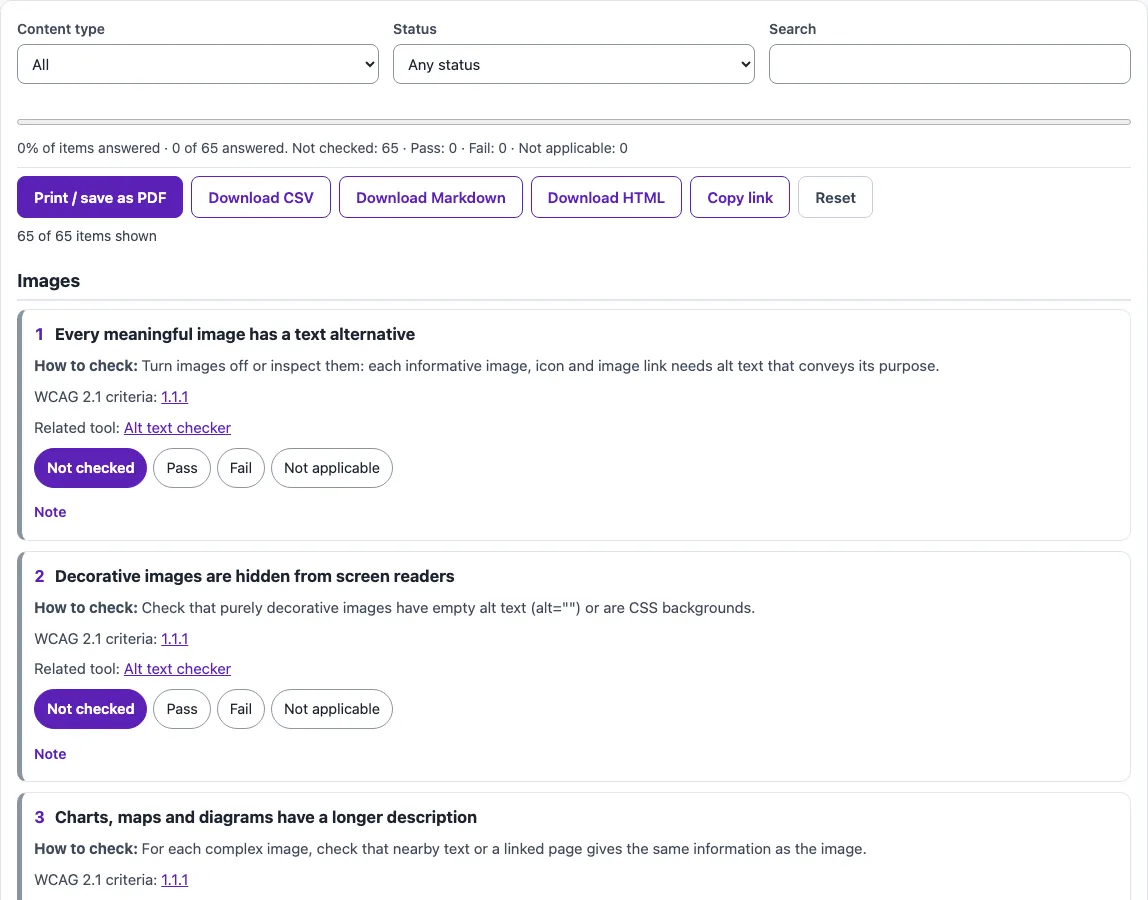
How to use the ADA website compliance checklist
- Open the Content type filter and choose the kind of content you are reviewing, such as images, video and audio, forms, or PDF documents.
- Use the Status filter to show only the items you have not finished.
- Type a keyword in Search to find a specific item, such as “alt text” or “contrast”.
- Read the How to check line under the item, then test that part of your page.
- Select the status radio button that matches your result.
- Write what you found in the notes box, including the page address.
- Watch the sticky progress indicator, which stays visible as you scroll.
- Open the WCAG 2.1 criteria links to read the Understanding page for that item, and the Related tool links when you need a specific test.
Use Print / save as PDF to keep a copy of your review. Download CSV, Markdown, or HTML exports your results in a format your team can use. Copy link copies a link that reopens the checklist with your statuses filled in (notes stay in this browser and in the downloaded files), and Reset clears the checklist so you can start again. Work group by group: images and text first, then forms and keyboard, then documents and third-party widgets.
Which ADA rules apply to my website?
Title II of the ADA covers state and local government, and the DOJ’s Title II web rule sets WCAG 2.1 Level AA as the technical standard for their web content and mobile apps. Title III covers businesses open to the public, and the DOJ says it requires them to provide full and equal enjoyment of their goods, services, and accommodations to people with disabilities, including on the web.
For Title III, the DOJ says it does not have a regulation setting out detailed standards. It names WCAG as an existing technical standard that offers helpful guidance.
When do the ADA web rule deadlines apply?
Under the Title II web rule, the compliance date depends on population. As ada.gov stated on October 13, 2026, entities with a population of 50,000 or more must comply by April 26, 2027, and entities with 0 to 49,999 people and special district governments must comply by April 26, 2028. An interim final rule published April 20, 2026 extended these dates from the original rule of April 24, 2024. Population is calculated from U.S. Census Bureau data, not from the number of people you serve or your number of employees.
Which content does the Title II web rule exempt?
ada.gov lists five limited exceptions: archived web content, preexisting conventional electronic documents, content posted by a third party, individualized password-protected documents, and preexisting social media posts. Each comes with conditions. Even exempt content may still have to be provided in an accessible format to a person with a disability who needs it, under the ADA’s effective-communication rules.
What are the website ADA compliance requirements the checklist covers?
WCAG 2.1 Level AA is built on 50 success criteria across levels A and AA. The checklist maps every item to at least one of them, so its items together cover all 50. The main areas include:
- Images: informative images need text alternatives that serve the same purpose, and decorative images should have empty alt text (SC 1.1.1).
- Color contrast: 4.5:1 for normal text and 3:1 for large text and UI components (1.4.3, 1.4.11).
- Keyboard: all functionality must work from a keyboard, with visible focus and no keyboard trap (2.1.1, 2.1.2, 2.4.7).
- Forms: labels or instructions, clear error messages, and error prevention for legal, financial, or data submissions (3.3.1 to 3.3.4).
Sources (checked 13 October 2026): ada.gov · ada.gov (2) · ada.gov (3) · W3C · W3C (2) · W3C (3)
Frequently asked questions
Is the tool free, and is anything I paste uploaded?
Yes. The ADA website compliance checklist is free and needs no account or sign-up. Everything runs in your browser, so nothing you paste, type, or select is uploaded.
Does finishing the ADA compliance checklist website review make my site compliant?
No. The checklist is a self-review aid, and it does not state that any site is compliant or accessible. Automated checks find only part of accessibility issues, so keyboard, screen reader, and content review are still needed.
Does the ADA web rule apply to a business website?
The Title II web rule covers state and local government. Businesses open to the public fall under Title III, where the DOJ has no detailed web regulation, so WCAG is used as helpful guidance.
Is an accessibility statement required?
An accessibility statement is not itself a WCAG requirement. The statement items in this checklist map to criteria for the statement page and contact form, not to a legal duty.
Do PDFs and other documents on my site count?
Yes. Documents you post, such as PDF forms, reports and agendas, are part of your web content, so the Documents (PDF) group asks the same questions about tags, reading order, headings and alternatives. Preexisting conventional documents can fall under a Title II exception, with conditions listed on ada.gov.
Is this checklist legal advice?
No. This is not legal advice. For questions about your obligations, speak with a qualified legal professional.
Related tools
- WCAG 2.2 checklist: Use it if you want to review against the newer WCAG 2.2 criteria.
- WCAG 2.1 AA checklist: Use it if you want a checklist focused only on WCAG 2.1 Level AA.
- Section 508 checklist: Use it if your review is for U.S. federal accessibility requirements.
- VPAT template / ACR builder: Use it when a buyer asks for a Voluntary Product Accessibility Template or Accessibility Conformance Report.
- Accessibility statement generator: Use it to draft an accessibility statement for your site.
- Website accessibility checker: Use it to run automated checks on a page before your manual review.
- ADA compliance checker: Use it as a starting point for an ADA-focused review of your site.