Alt Text Checker
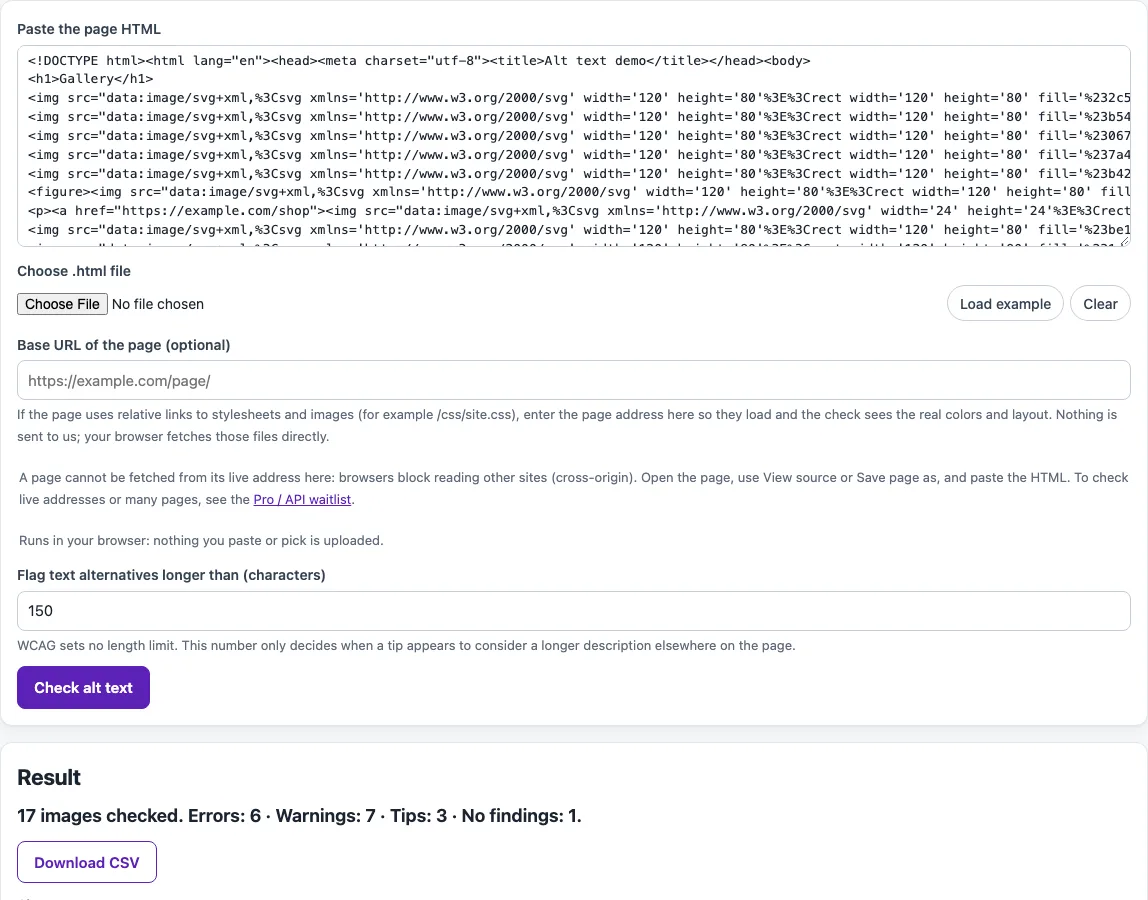
Paste a page's HTML to list every image, its alt text and the problems to fix, with a tip for each.
Recent
Your last 10 settings, saved only in this browser. Nothing is uploaded.
How to use the Alt Text Checker
- Paste your HTML into Paste the page HTML, or use Choose .html file. Click Load example to try a sample page with typical mistakes first.
- If you want remote images to show as thumbnails, enter the page address in Base URL of the page. Images embedded as data: URLs always show.
- Click Check alt text. The tool lists each img, input type=image, area, svg with role=img, other role=img, and object element it finds.
- Read the summary counts to see how many items were found and how many findings there are.
- Use the Show filter to display one severity at a time, such as Error only.
- Adjust Flag text alternatives longer than (characters) if you want a different length prompt. The default is 150.
- Go through each image entry. Check its type, its thumbnail or “No preview,” its alt text or name, and the findings with their fix tips.
- Click Download CSV to save the results.
Work through the Error items first, then the Warning and Tip items. Use the Show filter to keep the list short while you fix one problem type at a time. Then paste the updated HTML and run the check again.
What does alt text do for people who use screen readers?
Alt text is the text a screen reader announces in place of an image. WCAG success criterion 1.1.1 (Level A) requires non-text content to have a text alternative that serves the same purpose, except in listed cases such as decoration. An img with no alt attribute at all fails 1.1.1, and this checker marks it as an Error.
When should alt text be left empty?
Decorative images should get an empty alt, written as alt="" with no space between the quotes. A space can make some screen readers still announce the image. If an image repeats text right next to it, W3C’s decision tree also points to an empty alt for that redundant copy.
What should alt text say for an image inside a link or button?
For a functional image, alt text should name the destination or action, not describe how the picture looks. If an image is the only content of a link and its alt is empty, the link has no accessible name, which axe flags under link-name for SC 2.4.4 and 4.1.2.
Which alt text is not a real alternative?
Failure F30 covers text that is not an alternative, such as placeholders like “spacer,” “image,” or “picture,” programming references like “picture 1” or “0001,” and file names like “Oct.jpg” or “Chart.jpg.” W3C’s images tutorial says words like “image,” “icon,” or “picture” are not needed, though “photograph” or “painting” can matter when the type of image is important.
Why does the alt text checker flag text longer than 150 characters?
The 150-character limit is not a WCAG or W3C rule, and the W3C tutorials give no fixed length. It is an adjustable prompt in this tool, shown only as a tip. The tutorials advise alt text that is as concise as possible, puts the most important information first, and moves longer descriptions into a long-description method.
Sources (checked 13 October 2026): W3C · W3C (2) · W3C (3) · dequeuniversity.com · dequeuniversity.com (2)
Frequently asked questions
Is the alt text checker free, and is anything I paste uploaded?
Yes, the tool is free. Everything runs in your browser, so nothing you paste, type, or pick is uploaded, and no account is needed. The tool can detect missing, empty, or suspicious alt text, but it cannot judge whether the text matches the image, so you still need to review that yourself.
Does a clean report mean my page is accessible?
No. Automated checks find only part of accessibility issues, so keyboard testing, screen reader testing, and content review are still needed. This is not legal advice.
Why does the tool flag an image that only has a title?
The tool flags images that rely on a title alone as a Warning. It treats alt as the dedicated text alternative, so add alt text rather than relying on title.
Can I leave out the alt attribute on purpose?
Leaving out the alt attribute entirely is flagged as an Error, because some screen readers then read out the file name instead. For a decorative image, use alt="" instead, which is an intentional empty value.
Why is the same alt text flagged on several images?
The tool flags identical alt text on 3 or more different images as a heuristic of its own. It is not a WCAG requirement, so check whether each image really needs its own description.
Which elements does the checker look at?
It checks img, input type=image, area, svg with role=img, other role=img, and object elements. Each one is listed with its type, alt text or name, and any findings.
Related tools
- Website accessibility checker: use it to run broader accessibility checks on a whole website.
- ADA compliance checker: use it to see how a page is reviewed against ADA-related guidance.
- Keyboard accessibility test: use it to check whether a page can be used with a keyboard alone.
- Web accessibility testing plan: use it to plan manual and automated testing for a project.
- WCAG 2.2 checklist: use it to review your page against WCAG 2.2 criteria one by one.
- Color contrast checker: use it to check whether text and background colors have enough contrast.
- ARIA roles reference: use it when you need to confirm which role an element should have.
- aria-label and accessible name inspector: use it to see the accessible name an element gets from aria-label and related attributes.