aria-label: Accessible Name Inspector
Paste an HTML snippet to see the accessible name of every control, where it comes from and which aria-label uses to fix.
Recent
Your last 10 settings, saved only in this browser. Nothing is uploaded.
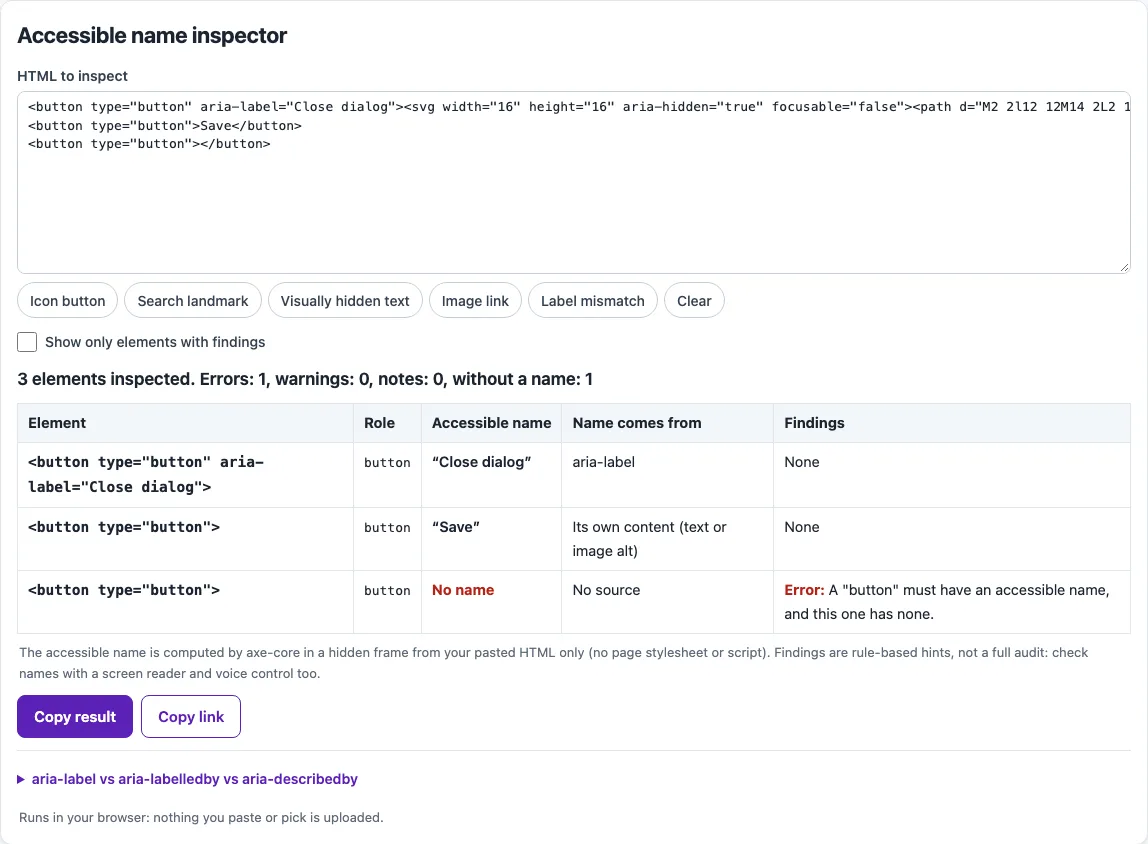
How to use the aria-label tool
- Paste your HTML into the “HTML to inspect” box, or choose a preset: Icon button, Search landmark, Visually hidden text, Image link or Label mismatch.
- Read the results table. Each row shows an element, its role, its accessible name (computed by axe-core), where that name comes from, and any findings.
- Look at the findings column. Common entries include empty aria-label, name prohibited, label on structure role, aria-labelledby wins or missing, Label in Name, name repeats role and missing name.
- Tick “Show only elements with findings” to hide elements that have no problems.
- Edit the HTML and check the table again until the findings you care about are gone.
- Use Copy result to copy the table, or Copy link to share the current setup.
The names are computed from your pasted HTML only, without the page’s stylesheets or scripts. Text hidden by CSS in your real stylesheet, or labels added by script, will not be seen, so confirm important names with a screen reader and with voice control software.
The comparison box beside the results sets aria-label, aria-labelledby and aria-describedby side by side, which helps when you are choosing between them. The HTML runs in a sandboxed frame without scripts, so markup you test cannot change the page around the tool.
What is aria-label, and when should you use it?
aria-label is an attribute you add to an element, such as <button aria-label="Close">. It is not a tag, so people searching for aria tags are usually looking for ARIA attributes like this one. It sets the element’s name to the string you give, and the ARIA 1.2 specification says it “labels the current element” in the same way aria-labelledby does, but from a string rather than from other elements.
The specification also says that if the label text is already in the page, usually as visible text, authors should use aria-labelledby and should not use aria-label. aria-label is for cases where the name cannot be taken from the page, or where a visible label is not wanted. An icon-only button is the classic case: it has no text, so it needs a name such as <button aria-label="Close"><svg aria-hidden="true">...</svg></button>, with the decorative icon hidden.
The order matters because the name is calculated in a fixed sequence. Hidden content that is not referenced is skipped first. Then aria-labelledby is used, then a non-empty aria-label, then the native label such as an HTML alt attribute or a label element. Text content comes next for roles that allow it, and the title attribute is used last. When both aria-labelledby and aria-label are present, aria-labelledby wins, which is why the tool flags it.
Why must the name match the visible label?
WCAG 2.2 success criterion 2.5.3, Label in Name, requires that a control’s accessible name contains the text shown on screen. People who use speech input activate controls by saying the visible words, and a hidden name that does not include them makes the control hard or impossible to reach. Matching is case-insensitive and most punctuation is ignored. As a good practice, put the visible label at the start of the name, so a visible “Search” becomes a name like “Search for a value”.
Some roles should not carry a name at all. aria-label is prohibited on roles such as generic, which a plain div or span has, and on paragraph, emphasis and strong. Other roles, including button, link, img, textbox and heading, must have a name. Do not repeat the role in the name, so write “Close” rather than “Close button”, because screen readers already announce the role. A name that is missing, prohibited or repeats the role will appear as a finding in the table.
Frequently asked questions
Is the tool free, and is anything I paste uploaded?
Yes, the tool is free and there is no account or sign-up. Everything runs in your browser, so nothing you paste, type or pick is uploaded.
Is aria-label the same as aria-labelledby?
They produce the same kind of result, a name for the element. aria-labelledby points to other elements by ID, while aria-label takes a plain string. If visible text exists on the page, the specification recommends aria-labelledby.
Can I put aria-label on a div?
Usually no. A plain div has the generic role, which prohibits aria-label, so the attribute cannot name it. Give the div a role that allows a name, or use a native element that already has the right meaning.
Should the name include the word “button” or “link”?
No. Assistive technology announces the role already, so “Close button” is read as “Close, button, button”. Use the action or destination alone, such as “Close” or “Read the full article”.
What is the difference between aria-label and aria-describedby?
aria-label sets the name, which is the main thing announced for an element. aria-describedby adds a description, which is extra information read after the name, and it does not replace the name.
Does a clean result mean my page is accessible?
No. Automated checks find only part of the accessibility issues. Keyboard testing, screen reader testing and a review of the content are still needed. This is not legal advice.
Related tools
- ARIA roles reference: Look up which roles exist and which ones need a name before you add aria-label.
- aria-labelledby ID reference checker: Use it when you point a name at other elements by ID and need to confirm those IDs exist.
- How to write alt text: Read this when an image needs a name and you are not sure what to write.
- Alt text checker: Use it to review the alt text on images that act as links or buttons.
- Keyboard accessibility test: Use it to check that labelled controls can be reached and used with a keyboard.
- Website accessibility checker: Use it to run a broader set of checks across a whole page.