aria-labelledby: ID Reference Checker
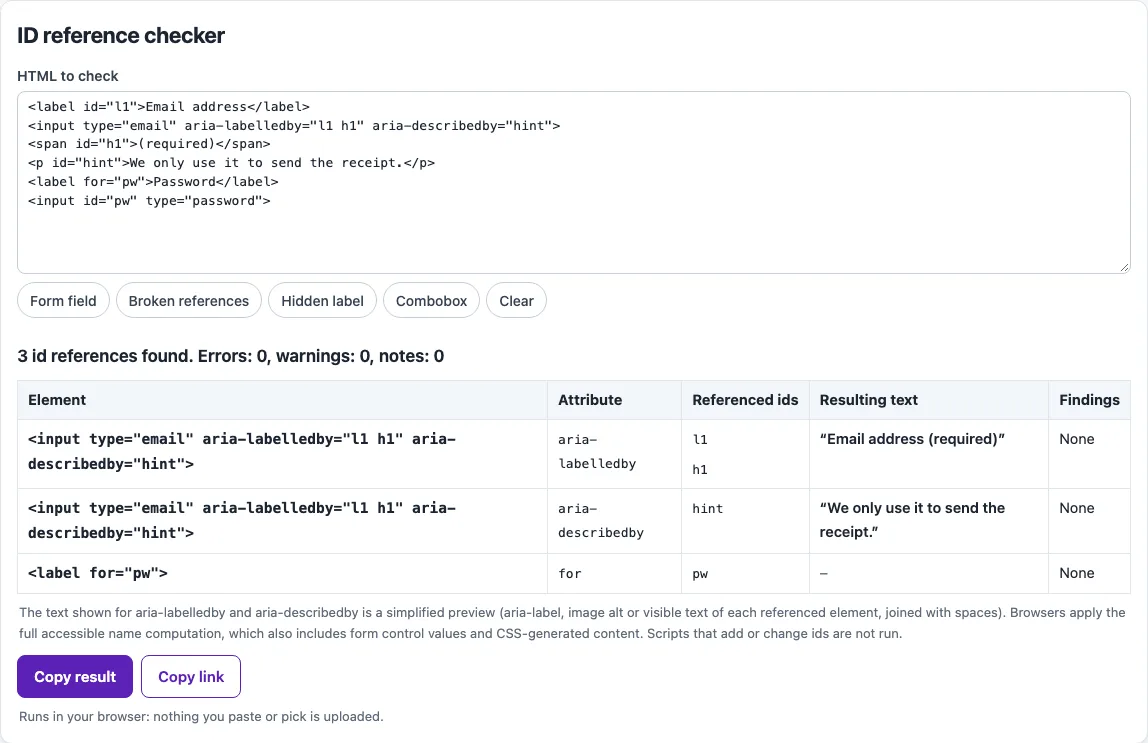
Paste HTML to check every ID reference and see the text each aria-labelledby and aria-describedby produces.
Recent
Your last 10 settings, saved only in this browser. Nothing is uploaded.
How to use the aria-labelledby checker
- Find the HTML to check textarea.
- Paste the HTML you want to test into the textarea. To start from an example, choose a preset: Form field, Broken references, Hidden label or Combobox.
- Read the results table. Each row is one id reference, such as aria-labelledby, aria-describedby, aria-controls, aria-owns, aria-flowto, aria-activedescendant, aria-errormessage, aria-details, label for, output for, headers, input list or form.
- Check the status of each id. It is either fine, missing, or a duplicate id.
- For aria-labelledby and aria-describedby rows, read the resulting text. If it is empty or not what you expect, fix the element the id points to.
- Read the findings for each row, then check the list of duplicate or invalid ids below the table.
- Fix the problems in your HTML, paste the code again, and repeat until the table shows no missing or duplicate ids.
The presets show four common situations: broken references, a hidden label, a form field, and a combobox. Running one first helps you see how the table reports each case before you test your own code. Because the checks run on your own device, you can also test draft code that is not published yet.
What does aria-labelledby do?
aria-labelledby gives an element its accessible name by referring to the id of one or more other elements. Its value is an ID reference list, so you separate several ids with spaces. The browser takes the text of the referenced elements in the order the ids appear, joins the pieces with a space, and uses the result as the name if it is not empty. Screen readers then announce that name.
aria-labelledby takes precedence over aria-label and over native labels, so it overrides them when both are present. Keep that in mind when you add it to an element that already has a label, because the name may change.
Hidden elements are normally skipped when a name is computed. The exception is an element that is directly referenced by aria-labelledby or aria-describedby. That hidden element and the content reached through it are still used, so pointing at a hidden element is allowed and common.
An element can also reference itself. This lets you combine its own text or aria-label with text from another element. For example, a “Read more” link can take its full name from itself and the article heading:
- the heading:
<h2 id="t1">Winter opening hours</h2> - the link:
<a id="m1" href="/hours/" aria-labelledby="m1 t1">Read more</a>
Its accessible name becomes “Read more Winter opening hours”. Without the self-reference, the name would be only “Winter opening hours”, and the visible words “Read more” would be missing from it, which matters for speech input users who say the visible words to activate the link.
ids must be unique in the document. If two elements share an id, a reference resolves to the first one. The ARIA guidance says that visible text and a native label (for and id) are better than aria-labelledby when they are enough, so check those first.
Sources (checked 13 October 2026): W3C · W3C (2) · HTML Standard · W3C (3) · HTML Standard (2) · HTML Standard (3)
Frequently asked questions
Is the tool free, and is anything I paste uploaded?
Yes, the tool is free, and there is no account or sign-up. Everything runs in your browser, so nothing you paste, type or pick is uploaded.
Can aria-labelledby point to a hidden element?
Yes. A hidden element that is directly referenced by aria-labelledby is still used to compute the name. Hidden elements that are not referenced are skipped.
Can an element reference itself in aria-labelledby?
Yes. This is useful for a button whose name should be its own text plus another element’s text. Include the element’s own id in the list, along with the other ids.
Should I use aria-labelledby or a label element?
Use visible text with a native label (a label element with for matching the input’s id) whenever that is enough. Use aria-labelledby when the name must come from text elsewhere on the page that cannot be a label.
What does aria-describedby do differently?
aria-describedby gives a description, not a name. Use it for hints or error text. For a longer explanation, aria-details points to one element that holds the extended description.
Why does my aria-labelledby give an empty name?
The name is used only if the result is not empty. Check that each id exists and is unique, because a missing or duplicated id is reported in the table. Then check that the referenced elements contain text.
Does a clean result mean my page is accessible?
No. Automated checks find only part of the accessibility issues. Keyboard testing, screen reader testing and content review are still needed.
Related tools
- /aria-roles/: Use the ARIA roles reference when you need to confirm which role an element should have before you label it.
- /aria-label/: Use the aria-label inspector to see the accessible name an element gets from aria-label.
- /keyboard-accessibility-test/: Use the keyboard accessibility test to check that labelled controls can be reached and used with a keyboard.
- /website-accessibility-checker/: Use the website accessibility checker for a broader automated scan of a page.
- /how-to-write-alt-text/: Use this guide when the label you need is for an image.