ARIA Roles List and Role Validator
Search every WAI-ARIA 1.2 role, see what it requires, or paste HTML to check the roles you use.
Recent
Your last 10 settings, saved only in this browser. Nothing is uploaded.
role attribute, such as role="button" or role="navigation", that tell assistive technology what an element is for. This page has a searchable ARIA roles list covering the 94 roles defined in WAI-ARIA 1.2, plus a role validator that checks your HTML for role mistakes. Both run in your browser, the tools are free, and there is no account or sign-up. Use the list to look up what a role means, which HTML element it matches and what it needs. Use the validator to catch unknown, abstract, deprecated or misused roles before you publish, while the markup is still easy to change.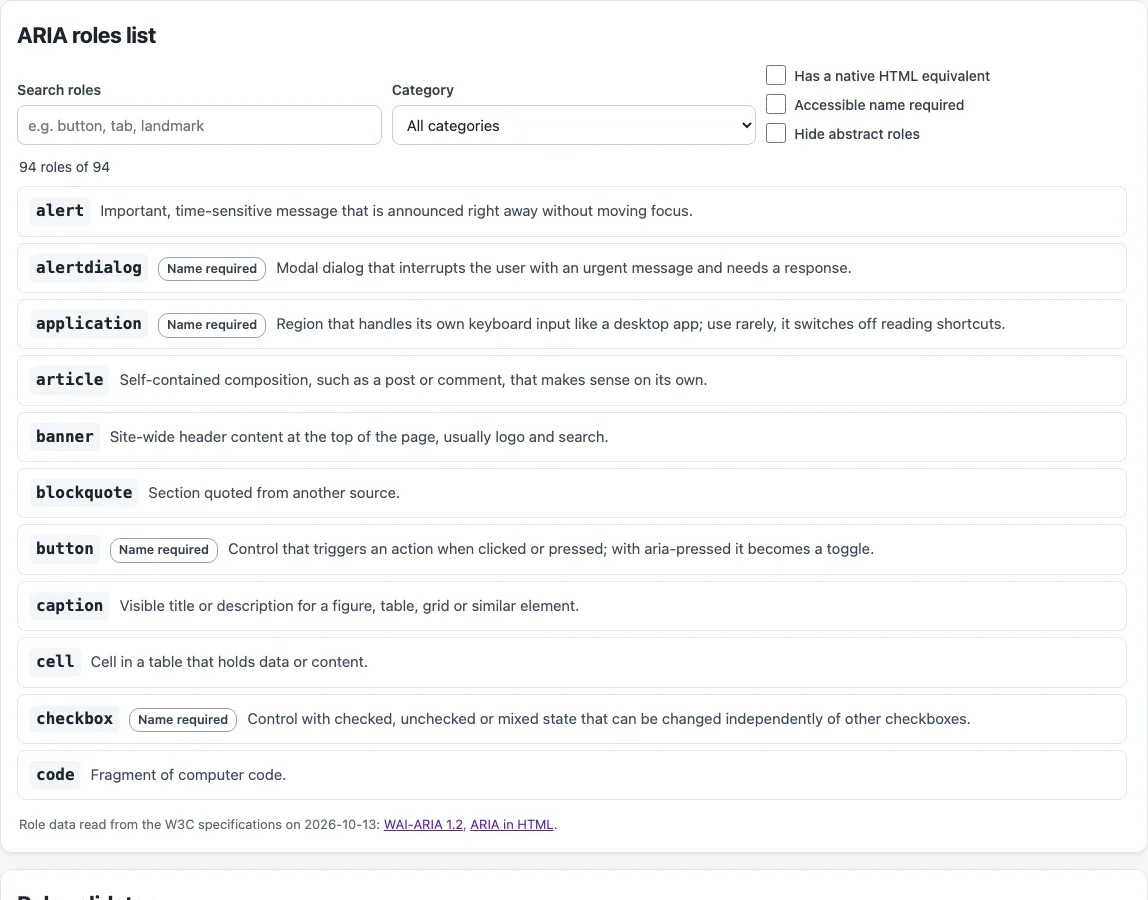
How to use the ARIA roles list
- Type a word in the Search roles box, such as “tab” or “dialog”.
- Open the Category menu and pick a group, such as widget roles or landmarks.
- Tick Has a native HTML equivalent to see only roles that a plain HTML element can provide. Tick Accessible name required to see roles that need a label. Tick Hide abstract roles to remove the 12 roles that authors must not use.
- Select a role to expand it. You will see its characteristics, its native HTML, a minimal example and a link to the specification. Use Copy example to copy the example.
- Paste your markup into the HTML to check box in the role validator. If you want a starting point, choose one of the presets: Common mistakes, Tabs, Custom widgets or Native elements.
- Read the results. They list unknown, abstract, deprecated and redundant roles, missing required attributes and context, prohibited attributes, and presentation roles on focusable elements. Fix each item, then check again.
Use Copy result to copy the validator output. Copy link saves your filters and short snippets in the address bar, so you can return to the same view or share it with a colleague.
What are ARIA roles?
ARIA roles are values of the role attribute that give an element a meaning a screen reader can announce. WAI-ARIA 1.2 defines 94 roles, and 12 of them are abstract (for example command, landmark and widget). Abstract roles exist only to organize the specification, so you must not use them in your code.
The other roles fall into groups. Widget roles include button, checkbox, slider and tab. Composite widgets include combobox, listbox, menu and tree. Document structure roles describe parts of a document. There are eight landmark roles, such as banner, main, navigation and search. Five live region roles (alert, log, marquee, status and timer) announce changes, and two window roles, dialog and alertdialog, describe popup windows.
Before you add any role, follow the first rule of ARIA use: if a native HTML element already has the semantics and behavior you need, use it. A <button> is already a button, and a <nav> is already navigation. Adding role="button" to a <button> is not recommended, because it repeats what the element already provides. The second rule is not to change native semantics unless you really have to. The third is that every interactive ARIA control must work with the keyboard. The fourth is never to use role="presentation" or aria-hidden="true" on a focusable element.
Which ARIA roles need extra attributes, a parent or a name?
Several roles need extra attributes, a specific parent, or an accessible name. A checkbox, radio, switch or menuitemcheckbox needs aria-checked, and a slider or meter needs aria-valuenow. A combobox needs aria-controls and aria-expanded. Some roles only work inside a particular parent: a tab needs a tablist, a listitem needs a list, and a row needs a table, grid, treegrid or rowgroup.
Roles such as button, checkbox, link, textbox and dialog need an accessible name, usually from visible text or an aria-label. Roles such as generic, none, presentation, paragraph and strong cannot have a name set by authors, so aria-label and aria-labelledby are prohibited on them. The contents of button, checkbox, img, option, slider and several other roles are presentational, so their children are not exposed separately.
Frequently asked questions
Is the tool free, and is anything I paste uploaded?
Yes, the tools are free, and there is no account or sign-up. Everything runs in your browser, so nothing you paste, type or pick is uploaded.
Does the ARIA roles list include every role?
It covers the 94 roles defined in WAI-ARIA 1.2. The directory role is deprecated, so use list or your host language’s list element instead.
Can I use any ARIA role on any element?
No. Each role has allowed elements, required attributes and required parents. ARIA in HTML lists the roles allowed on each element, and some elements, such as meta, script and input type=“hidden”, allow no role at all.
Does adding ARIA roles make my site accessible?
No. Automated checks find only part of the accessibility issues, so keyboard testing, screen reader testing and content review are still needed. This is not legal advice.
What does the role validator check for?
It reports unknown, abstract, deprecated, redundant and not-allowed roles, missing required attributes and context, prohibited attributes, and presentation roles on focusable elements. Paste your HTML into the HTML to check box to see the results. It reads the markup only, so it cannot tell whether your script adds the keyboard behavior a role promises.
Related tools
- ARIA label and accessible name inspector: Use it when a role gets its name from an
aria-label. - aria-labelledby ID reference checker: Use it when a role gets its name from another element by ID.
- Keyboard accessibility test: Use it to check that your interactive ARIA controls work with the keyboard.
- Alt text checker: Use it to review the text on images, including
imgroles. - Website accessibility checker: Use it for a broader automated scan, knowing it finds only part of the issues.