VPAT Template & Accessibility Conformance Report Builder
Enter your product details, choose a WCAG version, set a conformance level and remarks for each criterion and download the report.
Recent
Your last 10 settings, saved only in this browser. Nothing is uploaded.
How to use the VPAT builder
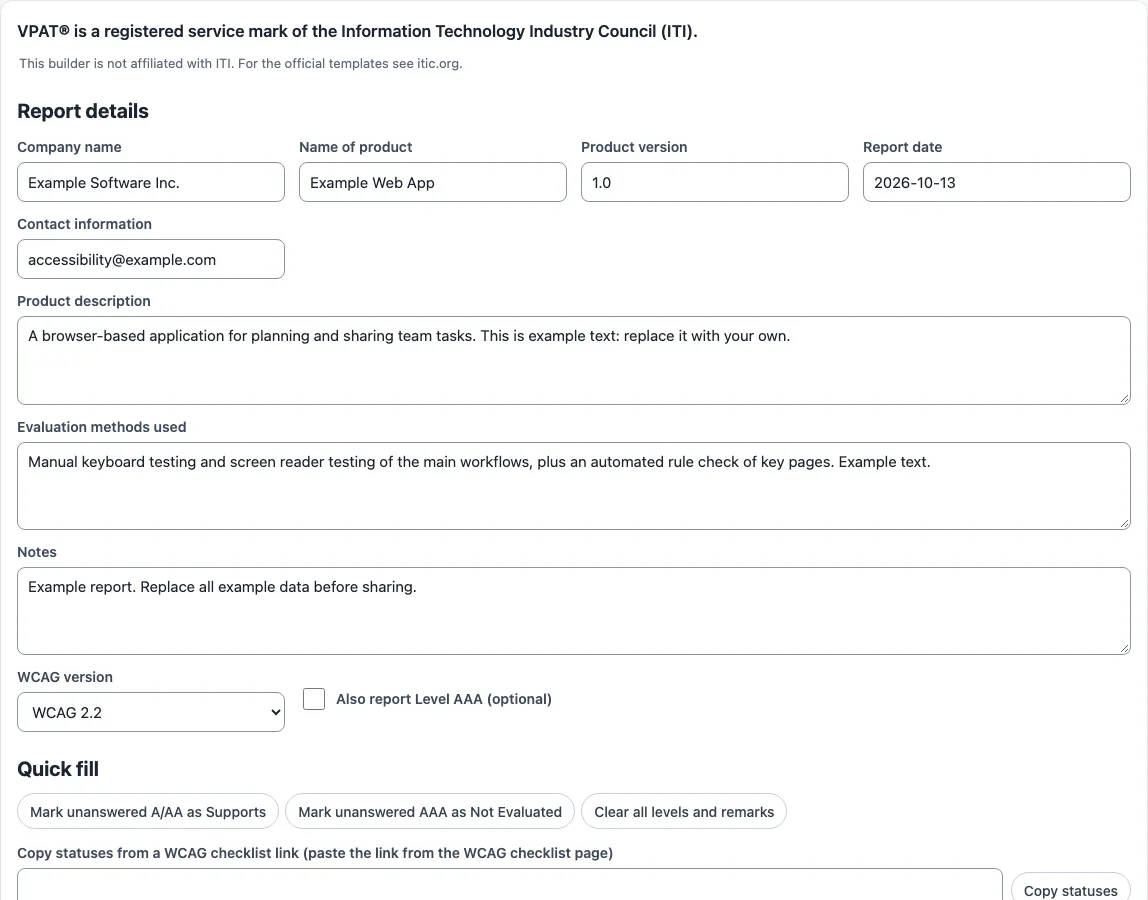
- Open the Report details section and fill in Company name, Name of product, Product version, Report date, Contact information, Product description, and Evaluation methods used. Add Notes if you need them.
- Choose a WCAG version: 2.2, 2.1 or 2.0. Tick Also report Level AAA (optional) if your report should include AAA criteria.
- In the conformance table, pick a Conformance Level for each criterion from the list.
- Write the Remarks and Explanations for each criterion. Explain why you chose that answer.
- To save time on statuses, use the quick fill chips, or use Copy statuses from a WCAG checklist link.
- Watch the Report check panel. It lists errors and suggestions as you work.
- When the report is ready, choose Download report (.html), Print / save as PDF, or Download CSV.
To keep work between visits, select Download draft (.json) and later use Upload draft (.json) to reload it. Your draft also autosaves in this browser. Load example shows a filled-in sample so you can see what a finished report looks like. Reset clears the form. Start with the criteria you have already tested; the Report check panel shows which rows still have no conformance level, so nothing is left blank by accident.
What do the VPAT conformance terms mean?
Each criterion in a VPAT gets one of five terms. Supports means at least one method meets the criterion without known defects, or it meets the criterion with equivalent facilitation. Partially Supports means some functionality does not meet the criterion. Does Not Support means the majority of functionality does not meet it. Not Applicable means the criterion is not relevant to the product. Not Evaluated can only be used for WCAG Level AAA criteria.
The Remarks and Explanations field must justify each answer. For Partially Supports or Does Not Support, name the functions or features that have issues and explain how they fall short. If a criterion does not apply, say why. If you use an accessible alternative, describe it.
The official templates come in four VPAT 2.5 editions: 508 (U.S. Revised Section 508), EU (EN 301 549), WCAG (WCAG 2.0, 2.1 and 2.2) and INT (all three standards). The current revision of the template files is 2.5Rev. Choose the edition that matches the standard your buyer asks about.
What must an Accessibility Conformance Report contain?
ITI’s template instructions list the parts every report needs: a title in the form “[Company Name] Accessibility Conformance Report”, the template version, the product name and version, a report date (at least month and year), a product description, contact information, notes, the evaluation methods used and the standards covered, followed by the conformance tables. All criteria of each level you report must be answered. Remarks should name the features that were tested and the method, such as a screen reader and browser pair. A report that leaves out these essential requirements may not be called a VPAT, so check ITI’s official template before you publish. The builder fills in these parts for you from the Report details section, and the Report check panel warns when a required field such as the company name is empty.
Sources (checked 13 October 2026): ITI
Frequently asked questions
Is the tool free, and is anything I paste uploaded?
Yes, the tool is free, and nothing you paste, type or pick is uploaded anywhere. Everything runs inside your browser, and there is no account or sign-up to create.
Your draft is autosaved in this browser’s local storage. If you want a copy you can keep or move to another device, download the draft as a .json file.
What is a VPAT used for?
Buyers use a VPAT to see how a product handles accessibility before they purchase it. It is the vendor’s self-reported statement, so buyers often ask for evidence as well.
What is the difference between a VPAT and an ACR?
A VPAT is the blank template with its criteria. When you complete it with documented test results, it becomes an Accessibility Conformance Report (ACR).
Does filling in this builder make my product accessible?
No. The builder does not test your product. Automated checks find only part of accessibility issues, so manual checks such as keyboard testing, screen reader testing and content review are still needed. This is not legal advice.
Do I have to use the ® symbol with VPAT?
ITI states that the VPAT name and report form are registered service marks and that the ® notation should be used. This builder is not affiliated with ITI, and the official templates are at itic.org.
Can I remove criteria from my report?
You cannot remove individual criteria, but you can remove whole sections, such as the AAA table. If you report WCAG 2.0 only, you may drop the 2.1 and 2.2 specific rows. If you report 2.1 only, you may drop the “2.2 only” rows.
Which VPAT edition covers Section 508?
The VPAT 2.5 508 edition covers U.S. Revised Section 508. The INT edition covers all three standards: Section 508, EN 301 549 and WCAG.
Related tools
- WCAG checklist: Use it to work through WCAG 2.2 criteria before you fill in your conformance table.
- WCAG 2.1 AA checklist: Use it when your report or your buyer focuses on WCAG 2.1 Level AA.
- Section 508 checklist: Use it when you need to check your product against Section 508 requirements.
- ADA website compliance checklist: Use it to review a website against common ADA-related accessibility points.
- Accessibility statement generator: Use it to draft a public accessibility statement for your website or app.
- Website accessibility checker: Use it to run automated checks on a page before you test it manually.
- ADA compliance checker: Use it to run an initial automated check of a site against ADA-related criteria.