WCAG 2.1 AA Checklist
Work through the 50 WCAG 2.1 Level A and AA criteria, mark each one and keep the result as a link, a PDF or a CSV.
Recent
Your last 10 settings, saved only in this browser. Nothing is uploaded.
This free WCAG 2.1 AA checklist lists all 50 Level A and Level AA success criteria from WCAG 2.1, so you can record whether each one passes, fails or does not apply to a web page. It runs in your browser, and you do not need an account or sign-up.
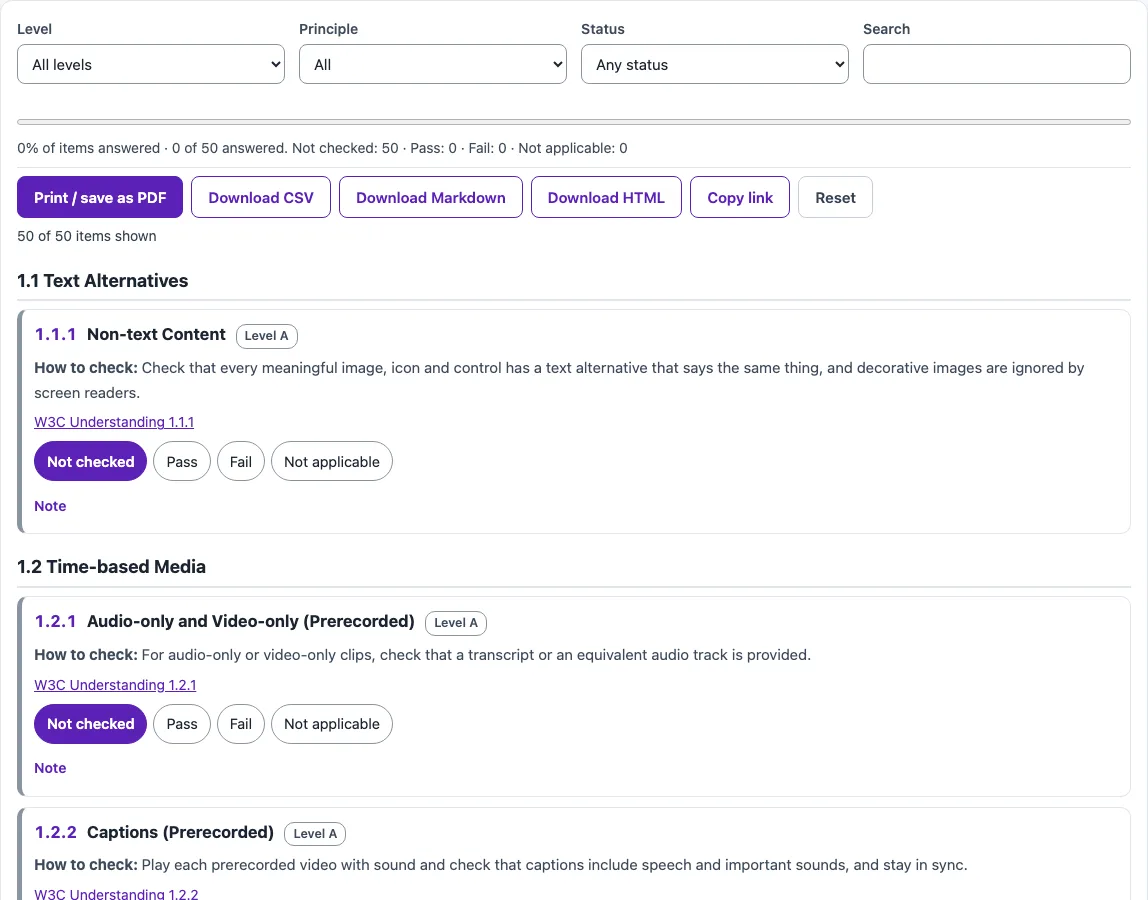
Use it when you are reviewing a site, a template or a set of pages and want one place to track progress against the standard. Each criterion shows a short “How to check” line and a link to the W3C’s Understanding document, so you know what to look for and why it matters. Filters let you narrow the list by level, principle, status or keyword, and a sticky progress bar shows how far you have got.
The checklist is a self-review aid. It helps organize your testing but does not replace manual checks.
How to use the WCAG 2.1 AA checklist
- Set the Level filter to All levels to see the full set of 50 criteria, or choose A or AA to narrow the list.
- Use the Principle filter to focus on Perceivable, Operable, Understandable or Robust.
- Open a criterion and read its How to check line. Select the W3C Understanding link for fuller guidance.
- Test the page with your own method, then choose a status: Not checked, Pass, Fail or Not applicable.
- Write anything useful in the Note field, such as the page address, the element you tested or what you saw.
- Use the Status filter to list only the Fail or Not checked items so you can plan your next round of testing.
- Type in the Search box to find a criterion by number or keyword, such as “contrast”.
- Watch the sticky progress bar to see how many criteria you have marked.
When you finish, use Print / save as PDF to keep a copy of your results, or Download CSV, Download Markdown or Download HTML to share them in the format you need. Copy link gives you a link that reopens the checklist with your statuses filled in, and Reset clears your work so you can start again.
What does the WCAG 2.1 AA checklist cover?
The checklist covers the 50 success criteria in WCAG 2.1 at Levels A and AA: 30 at Level A and 20 at Level AA. They are grouped under four principles: Perceivable (20), Operable (17), Understandable (10) and Robust (3). Each criterion is a testable requirement, such as providing text alternatives for images or making functions usable from a keyboard.
How many criteria does WCAG 2.1 Level AA include?
Level AA alone has 20 criteria. Conforming to Level AA also means meeting every Level A criterion, so the full set to check is 50.
Which criteria were added in WCAG 2.1?
WCAG 2.1 added 12 criteria at Levels A and AA. The Level A additions are 2.1.4 Character Key Shortcuts, 2.5.1 Pointer Gestures, 2.5.2 Pointer Cancellation, 2.5.3 Label in Name and 2.5.4 Motion Actuation. The Level AA additions are 1.3.4 Orientation, 1.3.5 Identify Input Purpose, 1.4.10 Reflow, 1.4.11 Non-text Contrast, 1.4.12 Text Spacing, 1.4.13 Content on Hover or Focus and 4.1.3 Status Messages.
Is 4.1.1 Parsing part of WCAG 2.1 AA?
Yes. 4.1.1 Parsing is a Level A criterion in WCAG 2.1, and the checklist includes it. It was removed only in WCAG 2.2.
What are the numeric thresholds to check?
Under 1.4.3 Contrast (Minimum), normal text needs a contrast ratio of 4.5:1 and large text needs 3:1. Under 1.4.11 Non-text Contrast, parts of components and graphics need 3:1. Under 1.4.10 Reflow, content must not need two-directional scrolling at a width equivalent to 320 CSS px, which is 400% zoom on a 1280 px screen. Under 1.4.12 Text Spacing, content must not be lost when line height is 1.5 times the font size, paragraph spacing is 2 times, letter spacing is 0.12 times and word spacing is 0.16 times.
Which laws and standards refer to WCAG 2.1 AA?
Three sources name it. The U.S. Department of Justice’s ADA Title II web rule states that its technical requirements are WCAG 2.1 Level AA, and content a public entity gets from vendors or contractors must meet it too. EN 301 549 V3.2.1 says conformance with WCAG 2.1 Level AA is equivalent to conforming with its clauses 9.1 to 9.4 and 9.6. Revised Section 508 is different: E205.4 requires WCAG 2.0 Level A and AA, not 2.1.
Sources (checked 13 October 2026): W3C · W3C (2) · W3C (3) · ada.gov · ada.gov (2) · ETSI
Frequently asked questions
Is the tool free, and is anything I paste uploaded?
Yes, the tools are free and there is no account or sign-up. Everything runs in your browser, so nothing you paste, type or pick is uploaded.
Does passing every item mean a site meets WCAG 2.1 AA?
No. The checklist is a self-review aid, not proof of conformance. Automated checks find only part of accessibility issues, so keyboard testing, screen reader testing and content review are still needed. This is not legal advice.
When do the ADA web rule compliance dates apply?
As ada.gov states them, public entities with a population of 50,000 or more must comply by April 26, 2027. Entities with 0 to 49,999 people and special district governments have until April 26, 2028. Population figures come from U.S. Census Bureau data.
Should I check WCAG 2.1 AA or WCAG 2.2?
Check the version your contract, policy or rule names. The W3C designed WCAG 2.2 so that content conforming to 2.2 also conforms to 2.1, so a site tested against 2.2 AA covers 2.1 AA as well; the WCAG 2.2 checklist adds the six new A and AA criteria.
Should I use this checklist for Section 508?
Not for the revised Section 508 rule, because E205.4 points to WCAG 2.0 Level A and AA rather than 2.1. The Section 508 checklist on this site is built for that purpose.
Related tools
- WCAG 2.2 checklist: Use it if you want to check against the newer WCAG 2.2 criteria instead of 2.1.
- Section 508 checklist: Use it when your review is for U.S. federal Section 508 requirements.
- ADA website compliance checklist: Use it to organize a review of a site for ADA obligations.
- VPAT template / ACR builder: Use it to document how your product or site meets accessibility standards in a VPAT or ACR.
- Accessibility statement generator: Use it to draft a public accessibility statement for your website.
- Website accessibility checker: Use it to run an automated check on a page before your manual testing.
- ADA compliance checker: Use it to look at your site’s ADA-related status as a starting point for review.