WCAG 2.2 Checklist
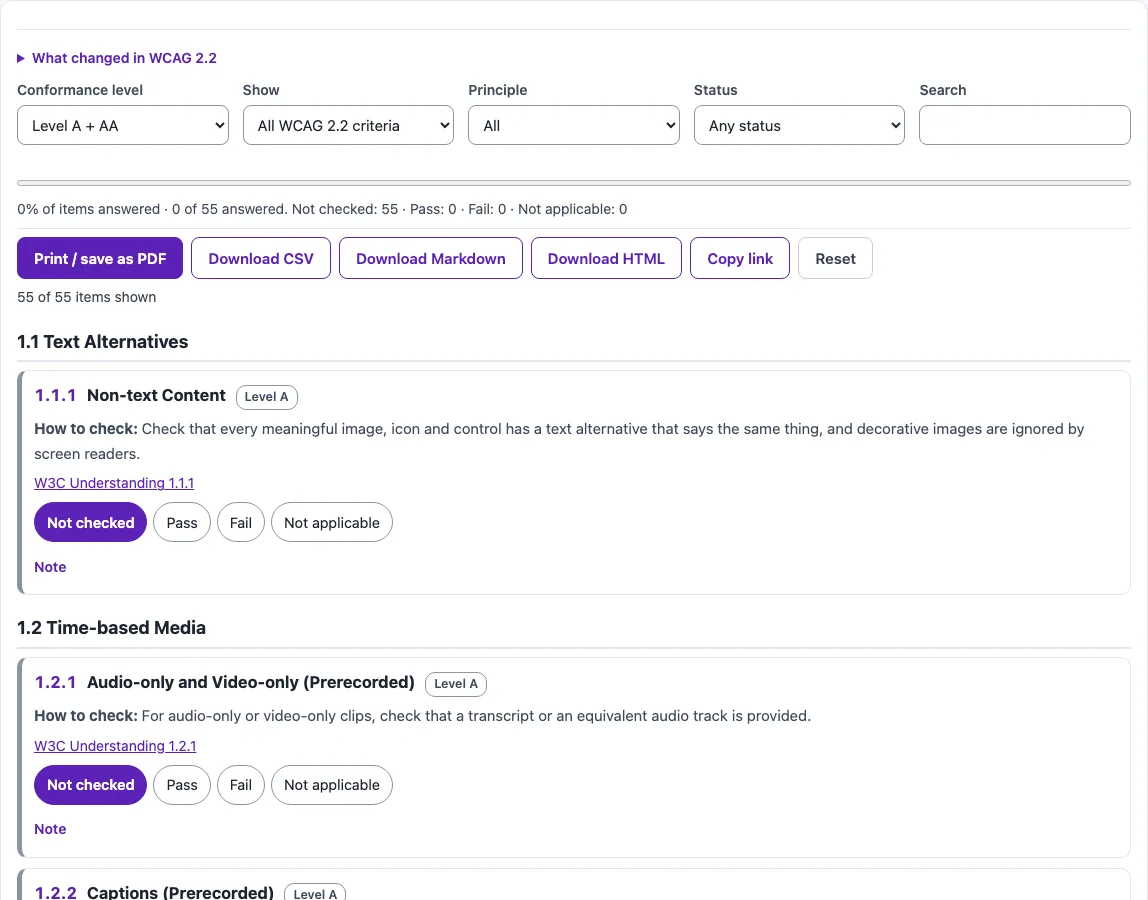
Mark each WCAG 2.2 success criterion as passed, failed or not applicable; filter by level, then share, print or export the result.
Recent
Your last 10 settings, saved only in this browser. Nothing is uploaded.
The WCAG 2.2 checklist is a free tool that lists every Web Content Accessibility Guidelines 2.2 success criterion so you can record, one by one, whether your page or site passes, fails or does not apply. WCAG 2.2 has 86 success criteria, and the default view shows the 55 criteria at Level A and AA.
Each item includes a “How to check” line and a link to the W3C Understanding document, so you can read the intent behind a criterion before you mark it. You can filter the list by principle, status or keyword, and you can show only the criteria added in 2.2.
The tool runs entirely in your browser. There is no account or sign-up. A checklist is a self-review aid, not a verdict: automated tools find only part of the issues, so keyboard, screen reader and zoom checks are still needed.
How to use the WCAG 2.2 checklist
- Open the “Conformance level” select. The default is A + AA, which shows 55 items. Choose Level A, or Levels A, AA and AAA, if you need a different set.
- Open the “Show” select and pick all criteria, or only the criteria new in 2.2.
- Read the “How to check” line for an item. If you need more detail, open its “W3C Understanding” link.
- Set the status radio to Not checked, Pass, Fail or Not applicable.
- Type anything useful in the “Note” field, such as the page you tested or the fix you need.
- Use the “Principle”, “Status” and “Search” filters to find the items you still need to review. The sticky progress bar shows how far you have got.
When you finish, use “Download CSV”, “Download Markdown” or “Download HTML” to save your results, or “Print / save as PDF” to keep a copy. “Copy link” puts your statuses into the link, so you can share your progress. “Reset” clears all statuses. Notes are kept only in this browser’s local storage, not in the link, so download a file if you want to share them. The “What changed in WCAG 2.2” box explains the updates before you start.
What are the principles behind the WCAG 2.2 checklist?
WCAG is organized under four principles, often shortened to POUR: Perceivable, Operable, Understandable and Robust. Every success criterion belongs to one of them, which is why the Principle filter groups the list this way. Under the four principles sit 13 guidelines, such as 1.4 Distinguishable or 2.1 Keyboard Accessible, and the success criteria are the testable statements under each guideline.
Perceivable means information can be sensed by users. Operable means the interface can be used with a keyboard and other inputs. Understandable means content and controls are clear. Robust means content works with current and future assistive technology.
How many success criteria does WCAG 2.2 have?
WCAG 2.2 has 86 success criteria: 31 at Level A, 24 at Level AA and 31 at Level AAA. Level A is the most basic tier, and AAA is the most demanding.
What does AA conformance mean in WCAG 2.2?
Conformance at AA means meeting all Level A and Level AA criteria, which is 55 criteria in WCAG 2.2 (31 + 24). The W3C does not recommend requiring AAA conformance as a general policy, because it is not possible to satisfy all AAA criteria for some content.
Which criteria are new in WCAG 2.2?
Nine criteria are new: 2.4.11, 2.4.12, 2.4.13, 2.5.7, 2.5.8, 3.2.6, 3.3.7, 3.3.8 and 3.3.9. Six of them fall inside an A + AA audit: two at Level A (3.2.6 and 3.3.7) and four at Level AA (2.4.11, 2.5.7, 2.5.8 and 3.3.8). Criterion 4.1.1 Parsing, which was in WCAG 2.0 and 2.1, is removed in 2.2 because assistive technology no longer parses HTML directly.
What do the target size and focus rules require?
2.5.8 Target Size (Minimum) asks that pointer targets be at least 24 by 24 CSS pixels, with exceptions for spacing, inline, equivalent, user agent and essential cases. 2.4.11 Focus Not Obscured (Minimum) asks that a component with keyboard focus is not entirely hidden by author-created content such as sticky headers or cookie banners. For text contrast, 1.4.3 Contrast (Minimum) sets 4.5:1 for normal text and 3:1 for large text.
Frequently asked questions
Is the tool free, and is anything I paste uploaded?
Yes, the tools are free. Everything runs in your browser, so nothing you paste, type or pick is uploaded, and there is no account or sign-up.
Does finishing the checklist mean my site meets WCAG 2.2?
No. The tool never states that a site meets WCAG. Marking every item Pass records your own review, and automated checks find only part of the issues, so manual checks are still needed.
Why does the default show 55 items instead of 86?
The default conformance level is A + AA, which covers the 31 Level A and 24 Level AA criteria. The 31 Level AAA criteria are included only when you choose Levels A, AA and AAA.
How is a WCAG 2.2 checklist different from a WCAG 2.1 AA checklist?
WCAG 2.2 adds nine new criteria and removes 4.1.1 Parsing. Six of the new criteria fall within A + AA, so a 2.1 AA review does not cover them.
Can I use one checklist for a whole website?
WCAG conformance applies to full pages and to complete processes, such as every step of a checkout. Most teams fill in one checklist per page template or per key process, then combine the results, rather than one checklist for the whole site.
Is this checklist legal advice?
No. This is not legal advice. If you have legal obligations, check them with a qualified professional.
Related tools
- Website accessibility checker: use it to run an automated scan of a site before your manual review.
- ADA compliance checker: use it to look at a site against ADA-related accessibility questions.
- Alt text checker: use it to check whether images have text alternatives.
- Keyboard accessibility test: use it to plan a keyboard-only walkthrough of your pages.
- Web accessibility testing plan: use it to organize which tests to run and when.
- Color contrast checker: use it to test text and interface colors against the contrast ratios.
- WCAG 2.1 AA checklist: use it if your project still targets WCAG 2.1 AA.
- Section 508 checklist: use it if you need a checklist organized around Section 508 requirements.